Dental Clinic Website Design: 7 Must-Have Features to Attract and Convert Patients
2026-05-23 • RedSun IT Services
Dental Clinic Website Design: 7 Must-Have Features to Attract and Convert Patients
In the digital age, a website for a dental clinic is no longer just a digital brochure; it is your clinic's virtual front desk. Whether you run a family general dentistry in Toronto, a cosmetic clinic in Vancouver, or an orthodontics practice in Calgary, your website is the first point of contact for potential patients.
If your website is slow, difficult to navigate, or lacks clear booking features, users will bounce back to Google search results and choose another clinic down the street.
To convert search engine traffic into booked appointments, you must implement elements that build patient trust and remove booking friction. Here are the 7 essential dental clinic website design features that will turn your site into your practice's most productive team member.
1. Frictionless Online Appointment Booking
Modern patients expect convenience. Studies show that over 60% of dental patients prefer booking appointments online rather than calling during business hours, and many of these searches happen late in the evening.
An effective dental clinic web design integrates booking interfaces directly with practice management software (such as Curve Dental, Dentrix, or Open Dental). This lets patients:
- View real-time calendar availability for cleanings or consults.
- Select their preferred dentist or hygienist.
- Receive automated SMS and email confirmations.
By offering online scheduling, you reduce the workload on your front-desk staff and prevent potential clients from calling competitors who offer easier booking options.
2. Emergency-Optimized Mobile Experience
A significant portion of dental searches are high-urgency queries. When someone experiences a sudden, severe toothache, a broken crown, or a chipped tooth, they immediately grab their phone to search for an "emergency dentist near me."
If your website takes more than 3 seconds to load on mobile networks, they will leave. As we explored in our guide on why slow websites lose customers and rankings, speed directly dictates conversion rates.
To convert emergency patients, your site must feature:
- A clean, ultra-responsive layout optimized for one-handed mobile navigation.
- A prominent, sticky Click-to-Call button that remains visible as they scroll.
- Clear instructions for emergency patients (e.g., direct contact numbers, clinic hours, and map directions).
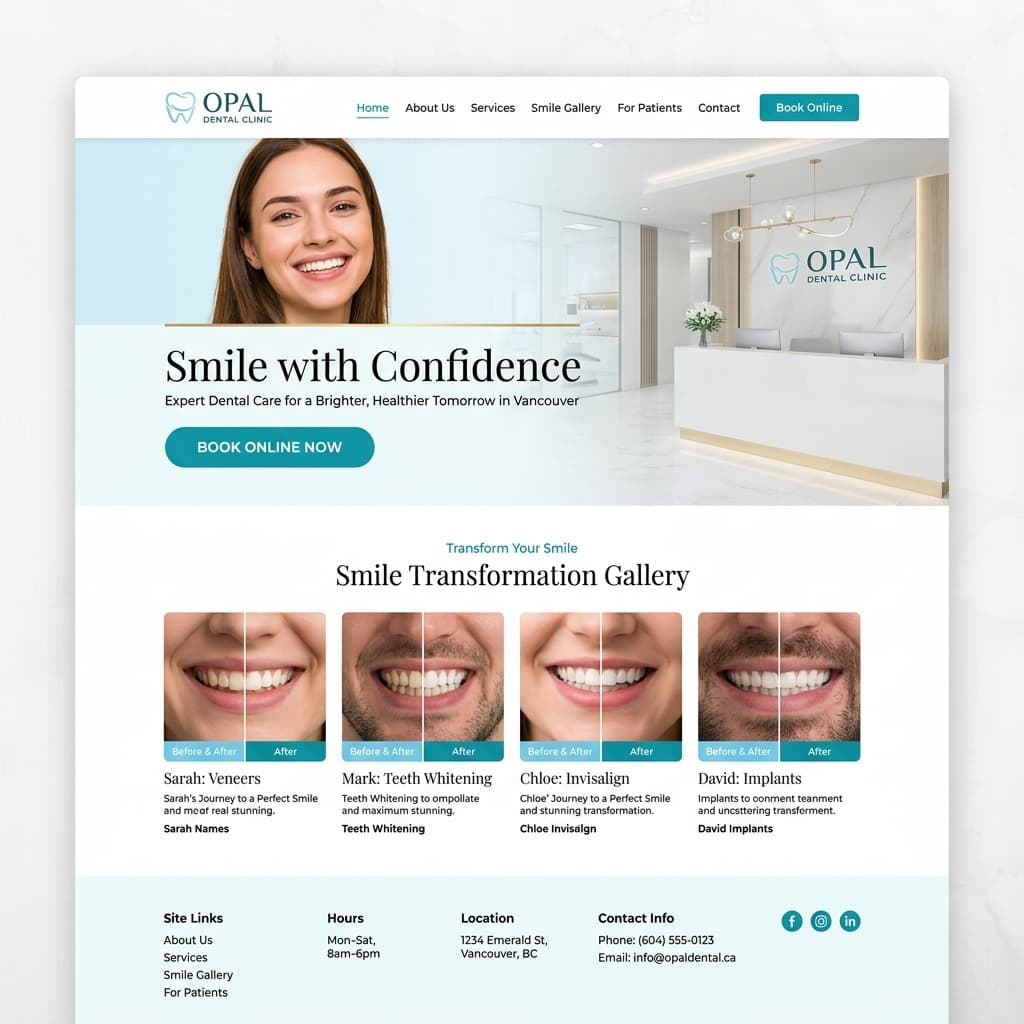
3. High-Performance Before-and-After Smile Galleries
Cosmetic dental treatments—like porcelain veneers, Invisalign, and teeth whitening—are high-value, high-margin services. Potential cosmetic patients rarely book based on text descriptions alone; they want visual proof of your expertise.
A "Smile Makeover" gallery showcasing real patient transformations builds immense credibility. However, massive image files can slow down your site. To keep your gallery fast:
- Convert all photos to modern web image formats like WebP or AVIF, which compress files up to 30% more than traditional JPEGs.
- Implement lazy loading so images only load when a user scrolls to that section.
- Ensure images display perfectly on mobile screens with easy zoom-in features.
4. Local Dental SEO & Google Reviews Integration
To acquire patients, your clinic must rank where patients are looking. When neighbors search for a dentist in their area, they rely heavily on Google Maps results and the local "3-Pack."
To support your local dental SEO efforts:
- Integrate a dynamic Google Reviews widget to display your 5-star patient reviews directly on your website.
- Implement local schema markup (structured JSON-LD code) to help search engines understand your physical clinic address, coordinates, hours of operation, and doctor specializations.
- Maintain dedicated pages for each service location if you operate multiple practices across Canada.
5. AI-Driven 24/7 Patient Assistants
Most dental offices close by 5:00 PM or 6:00 PM, but patient search traffic continues throughout the evening and weekends. If a patient is searching for cosmetic treatment on a Saturday night and has a question, they will not wait until Monday morning for an email reply.
By deploying an autonomous sales agent like LeadAdvisorAI, your website can:
- Qualify visitor interest in high-value services (such as implants or braces).
- Answer patient FAQs about insurance, pricing, and treatment procedures instantly.
- Capture contact details and book consultation times directly into your calendar.
This ensures you never miss a lead, even when your staff is out of the office.
6. HIPAA & PIPEDA Compliance
Dental clinics handle Personal Health Information (PHI). In Canada, patient data collected through online forms is regulated by the Personal Information Protection and Electronic Documents Act (PIPEDA) and local provincial health privacy laws.
Your website design must treat security as a priority:
- Use secure contact forms that encrypt patient submissions.
- Do not request detailed medical histories or social security numbers on standard booking forms.
- Host the website on secure, modern cloud architectures with active SSL certificates and daily database backups.
- Provide a clear, accessible Privacy Policy page to reassure patients about how their data is handled.
7. Digital Accessibility (AODA / ADA Compliance)
An inclusive medical website must be usable for all patient groups, including seniors and individuals with visual, auditory, or cognitive impairments.
In provinces like Ontario, public-facing dental websites must comply with Web Content Accessibility Guidelines (WCAG) under the Accessibility for Ontarians with Disabilities Act (AODA). Key accessibility practices include:
- Ensuring high contrast between text and background colors for readability.
- Making the entire website navigable using only keyboard controls.
- Adding descriptive alternative text (
alttags) to all functional images and patient photos. - Using clean, scalable fonts that support screen readers.
Feature Conversion & Operational Impact
Integrating these elements directly improves both new patient acquisitions and clinical efficiency:
| Website Feature | Conversion & SEO Impact | Operational Benefit |
|---|---|---|
| Online Booking API | Up to 30% increase in after-hours bookings | Reduces front-desk call volumes and administrative drag |
| Click-to-Call Mobile CTA | Higher conversion rate on mobile emergency searches | Routes urgent cases to clinic phone lines immediately |
| WebP Smile Galleries | Reduces bounce rates by loading galleries in under 1 second | Showcases cosmetic expertise without hurting mobile page speed |
| LeadAdvisorAI Integration | Qualifies and captures potential leads 24/7 | Books consultations automatically into practice calendars |
Secure More Patients for Your Practice
A high-converting website acts as a bridge between your local clinical expertise and potential patients searching for a trusted practitioner.
At Red Sun IT Services, we build fast, secure, and beautiful digital structures for dental practices across Canada. From setting up secure booking software connections to implementing advanced local SEO campaigns, we provide customized web design solutions that turn digital traffic into long-term patients.
👉 Contact Red Sun IT Services today for a free, comprehensive consultation to help you build the perfect website project for your practice.